

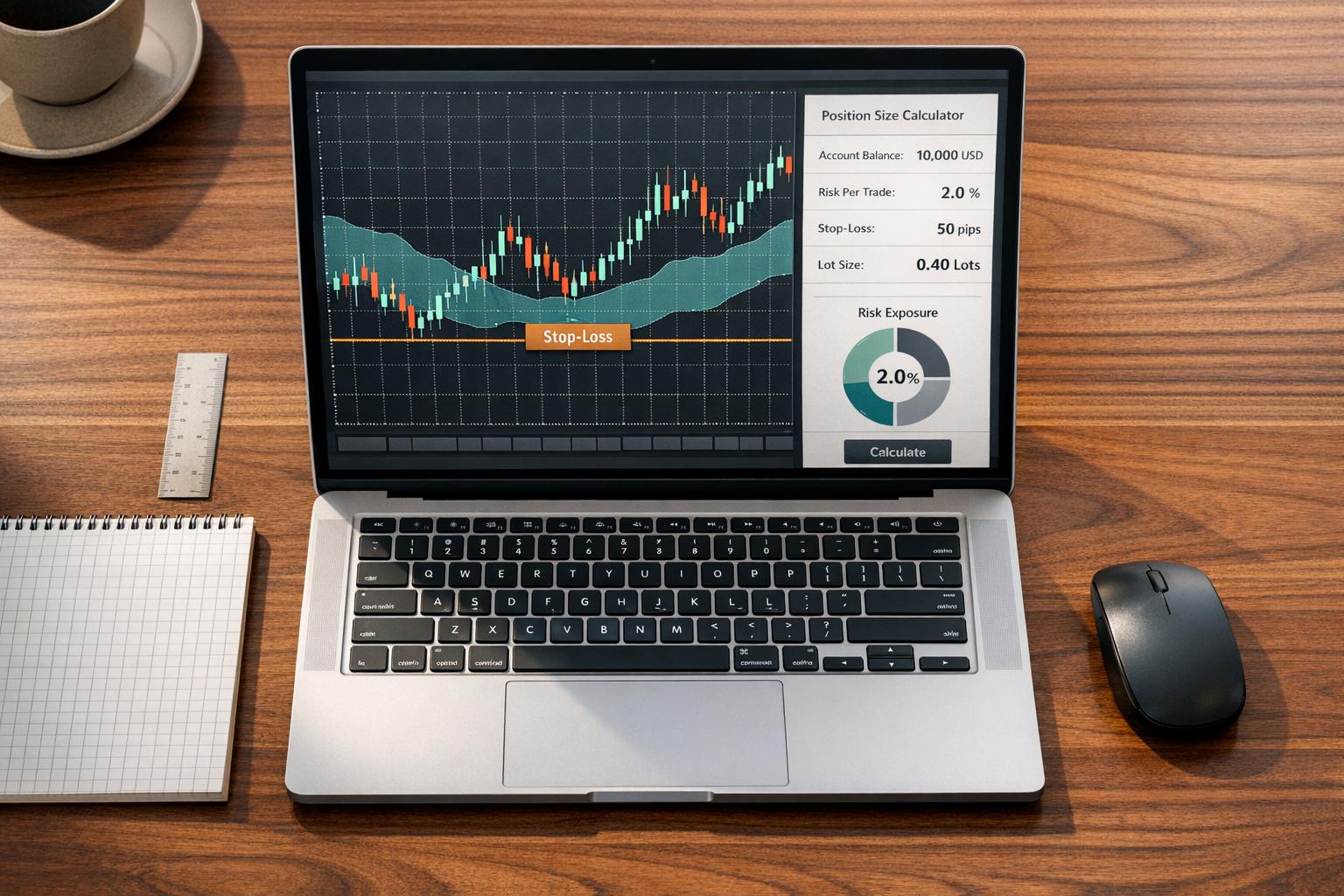
How much should you risk per trade on MT5? This is one of the most critical decisions traders face. Risk calculators and position sizing tools simplify this process by automating calculations, ensuring precision, and reducing errors. Here's what they do:
- Automate lot size calculations: Based on account balance, risk percentage, stop-loss distance, and live exchange rates.
- Visual feedback: Drag-and-drop stop-loss and take-profit levels directly on charts with real-time updates.
- Risk tracking: Monitor how prop firms track risk and total portfolio exposure and avoid over-leveraging.
- Advanced features: Tools like ATR-based stop-loss adjustments and broker commission inclusion enhance accuracy.
These tools save time, protect capital, and enforce discipline, especially for traders managing multiple positions or working with prop firm rules. Whether you're a beginner or experienced, they help you trade smarter by focusing on strategy, not math.
Lot Size Calculator MT5 and Position Size Calculator MT5 | Trade Manager MT5 Tutorial
Why Position Sizing Matters in Trading
Position sizing determines how many currency units you trade while keeping your maximum risk under control. Get it wrong, and you could drain your account. Get it right, and you'll have enough capital to stick with your strategy over the long term. Unfortunately, manual calculations make this process prone to mistakes.
Problems with Manual Position Size Calculations
Manual position size calculations are not only inefficient but also error-prone, especially when tick values fluctuate. For example, if you have a USD account and trade GBP/JPY, you need to account for current exchange rates to calculate the correct lot size. This task becomes nearly impossible during fast-moving, volatile markets.
MQL5 developer Conor Mcnamara explains this challenge well: "Manual calculation is not user-friendly given the variability of tick values among different symbols and brokers".
On top of that, using equal dollar amounts or fixed lot sizes doesn't account for volatility. For instance, a $20,000 position in a highly volatile asset with a wide stop-loss exposes you to much more risk than the same position in a stable asset.
How Position Sizing Affects Risk and Profits
Effective position sizing does more than just protect your capital - it can also improve your returns. In MT5 trading, position sizing tools ensure you risk only a small, predefined percentage of your account - often 1%. This approach aligns with automated risk management features, helping you adjust your risk appropriately whether you're on a hot streak or facing losses.
Advanced MT5 tools take it a step further. They calculate risk using a "Balance - CPR" (Current Portfolio Risk) method, which subtracts the risk of your open trades from your account balance when calculating new positions. This ensures you stay within your overall risk limits.
"The goal is not to avoid risk but to contain it. Mastering position sizing is how traders stay in the game long enough to let their strategy work." – BabyPips
Automated tools in MT5 eliminate the guesswork by instantly calculating lot sizes based on your account balance, chosen risk percentage, stop-loss distance, and live exchange rates. They also consider broker commissions and spreads, giving you a clear picture of potential losses before executing a trade. This precision allows traders to focus on strategy instead of worrying about calculation errors.
Main Features of MT5 Risk Calculators and Position Sizing Tools
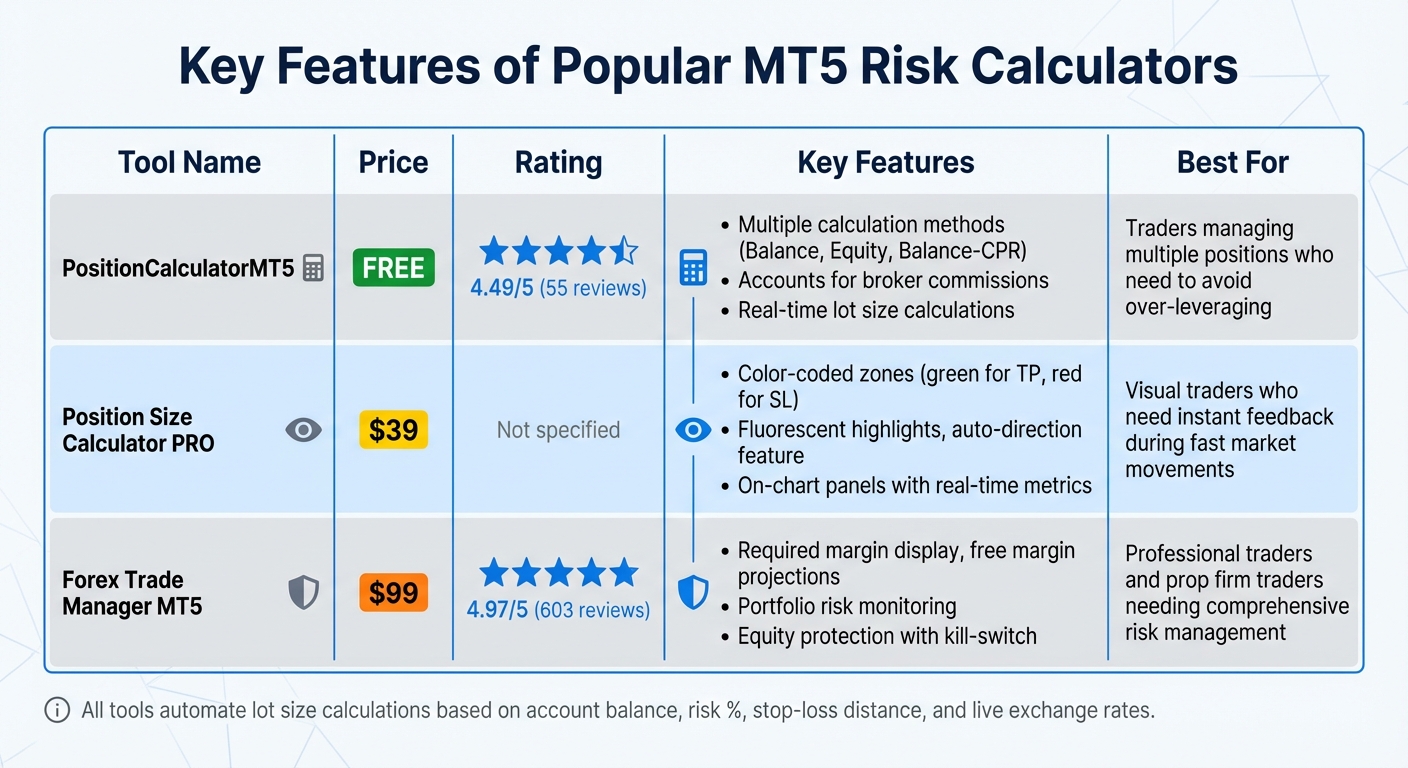
MT5 Risk Management Features Comparison Table
MT5 risk calculators are designed to give traders better control over trade sizes before committing their capital.
Automatic Lot Size Calculations
These calculators use real-time data - such as account balance, risk percentage, stop-loss distance, tick value, and exchange rates - to calculate precise lot sizes . For example, PositionCalculatorMT5, which has a 4.49/5 rating from 55 reviews, offers multiple calculation methods like Balance, Equity, and Balance – CPR (Current Portfolio Risk). The Balance – CPR method is particularly useful as it subtracts the risk already tied up in open trades from your account balance, helping you avoid over-leveraging when managing multiple positions.
"The main tab of the panel provides the primary control over the EA's functions and serves to output the most important calculation results: the position size, risk, reward, and risk-to-reward ratio."
- Nguyen Duy Trung, developer of PositionCalculatorMT5
Some calculators even account for broker commissions, ensuring that your total potential loss - including fees - stays within your set risk limit. This reduces the chance of input errors .
In addition to precise calculations, these tools provide real-time insights directly on your charts.
Live Updates and Visual Risk Displays
MT5 tools offer dynamic visual feedback that simplifies risk management. Take Position Size Calculator PRO (priced at $39) as an example - it uses color-coded zones on your chart to highlight take-profit areas in green and stop-loss zones in red . These zones adjust instantly as you modify your entry, stop-loss, or take-profit levels.
"Position Size Calculator PRO is a decision-support tool to standardize your money management and reduce sizing mistakes before entry."
- Prime Horizon, developer of Position Size Calculator PRO
Additional features like fluorescent highlights help clarify price levels during fast market movements. On-chart panels display real-time metrics, including pip distance, potential dollar profit or loss, risk percentage, and the current risk-to-reward ratio. Many tools also include an "Auto-Direction" feature, which automatically switches between Buy and Sell logic based on where your stop-loss is placed relative to the market price.
These visual tools not only streamline decision-making but also enhance your ability to analyze risk and margin in depth.
Risk Metrics and Margin Information
Beyond calculations and visuals, MT5 tools provide detailed risk and margin analysis to refine your trading strategy. For instance, Forex Trade Manager MT5 (priced at $99 with a 4.97/5 rating from 603 reviews) offers insights like the required margin for your position, projected free margin after trade execution, and the maximum position size allowed based on your leverage. These tools also monitor your total account exposure across all open trades and pending orders, helping you manage your overall risk effectively. Key metrics include:
| Feature | What It Shows | Why It Matters |
|---|---|---|
| Required Margin | Capital needed to open the position | Helps avoid margin calls |
| Free Margin | Available capital after trade execution | Shows room for additional trades |
| Portfolio Risk | Combined risk across all open positions | Helps manage total account exposure |
| R:R Ratio | Risk-to-reward ratio of your setup | Encourages maintaining favorable trade setups |
Some tools incorporate volatility indicators like Average True Range (ATR) to dynamically adjust stop-loss levels. For example, instead of using a fixed pip amount, you could risk 2x ATR to align with current market conditions . Additionally, certain tools allow you to split a calculated position into multiple trades with different take-profit levels, enabling you to scale out of positions as the market moves in your favor.
How to Install and Use Position Sizing Tools in MT5
Using position sizing tools in MT5 can simplify risk management and streamline your trading process. Whether you're downloading tools from the built-in marketplace or external sources, the installation process is straightforward.
Installing Position Sizing Tools on MT5
The easiest way to install a position sizing tool is through the MQL5 Market, which is integrated into your MT5 platform. Start by opening the Toolbox window at the bottom of your screen, selecting the Market tab, and searching for tools like PositionCalculatorMT5 (free, rated 4.49/5 stars from 55 reviews) or Position Size Calculator PRO (priced at $39). Once you've found the tool you want, click Download or Purchase, and the installation will complete automatically.
If you're downloading tools from external sources such as GitHub or EarnForex, you'll need to manually add the files. Open MT5, go to File > Open Data Folder, and navigate to either MQL5 > Experts (for tools that can execute trades) or MQL5 > Indicators (for tools used only for calculations). Paste the downloaded files into the appropriate folder and restart MT5. Alternatively, you can right-click the Experts or Indicators folder in the Navigator panel and select Refresh to load the new files.
For tools classified as Expert Advisors (EAs) that execute trades, make sure algorithmic trading is enabled. Go to Tools > Options > Expert Advisors, and confirm that the Algo Trading button at the top of your terminal is green. When you add the tool to a chart, a settings window will appear - ensure "Allow Algo Trading" is checked in the Common tab. If you encounter freezing or lag after an MT5 update (builds 557x or later), try switching the font in the input settings from "Courier" to "Arial."
Once the tool is installed, you'll need to configure it to match your trading strategy.
Setting Up Your Risk Parameters
After installation, the next step is to adjust the tool's risk settings based on your trading preferences. Most position sizing tools allow you to calculate risk using Account Balance, Equity, or Balance – CPR (Current Portfolio Risk, which factors in the risk from open trades). This flexibility is especially helpful when managing multiple positions and avoiding over-leveraging.
Define your risk percentage - many traders recommend risking only 1% to 2% of your account per trade for better control, though you can also set a fixed dollar amount. Enter your leverage and broker commissions per lot to ensure the tool includes all trading costs in its calculations.
Some tools come with preset risk buttons for quick adjustments during volatile markets. For instance, you might configure buttons for 1%, 1.5%, and 2% risk levels, making it easy to adjust your position size with a single click.
Using the Tool to Execute Trades
Once your risk parameters are set, these tools can simplify trade execution. Most tools display draggable lines on your chart to set Entry, Stop-Loss (SL), and Take-Profit (TP) levels. Simply drag the lines to your desired levels, and the tool will automatically recalculate your position size in real time.
As you adjust these levels, an on-chart panel updates key metrics like lot size, risk amount in dollars, potential profit, and risk-to-reward ratio. Some tools also support advanced features like ATR-based stop-loss placement, which calculates SL based on a multiple of the Average True Range, helping you account for market volatility.
When you're ready to trade, click the Trade button or use a keyboard shortcut for faster execution. Many tools also include an "Ask for confirmation" feature, which provides a final review of your lot size, total risk, and margin requirements before placing the order with your broker. This ensures accuracy and minimizes costly errors.
Advanced Trade Management with Position Sizing Tools
Position sizing tools are designed to handle complex trading scenarios by focusing on your total portfolio exposure instead of just individual trades. Below, we'll explore how these features integrate into your risk management strategy to provide a more comprehensive approach.
Tracking Total Risk Across Multiple Trades
Basic risk calculations are essential, but advanced tools take it a step further by monitoring your entire portfolio's exposure. Many of these tools include features like a Risk Tab or Portfolio Tab, which calculate the combined risk of all open positions and pending orders based on their stop-loss levels. This gives you a clear picture of the potential loss if every stop-loss is triggered simultaneously.
For example, the free Position Sizer EA offers a "Potential Portfolio Risk" feature. This handy tool displays your total account exposure, factoring in both planned trades and existing positions. It’s particularly useful during volatile periods, helping you avoid overexposure. Some tools even allow you to break down risk by symbol, so you can spot any over-concentration in your portfolio.
If you're managing a complex portfolio with hedged positions, specialized indicators can calculate worst-case scenarios using brute-force algorithms. These tools consider overlapping stop-loss and take-profit levels. Keep in mind, though, that this level of analysis can slow down performance if you're juggling more than 20 simultaneous orders.
Setting Risk Limits for Your Portfolio
Once you’ve quantified your overall risk, the next step is to set portfolio-level safeguards. These limits act as a safety net, preventing catastrophic losses. Many advanced tools allow you to define a Max Total Open Risk percentage - commonly set between 3% and 5% of your account. This percentage represents the potential loss from all open and pending trades combined. If this threshold is hit, the system blocks new trades until the exposure decreases.
For traders working with prop firms, some tools include "kill-switch" features. These automatically close all trades if a predefined daily loss limit or maximum drawdown is reached. For instance, Trade Manager MT5 offers an Equity Protection feature, which ensures that:
When your daily limit is reached, all your positions and orders will be completely closed automatically.
You can also set operational constraints, such as limiting the total trade volume (in lots) or capping the number of trades per symbol. These features are especially helpful during emotionally charged periods when overtrading is a risk. Additionally, syncing your tool's GMT offset with your broker's server time ensures that daily drawdown resets align with your trading schedule.
Building Position Sizing Into Your Trading Strategy
Position sizing tools should be an integral part of your trading workflow. When planning trades, use only uncommitted capital - your account balance minus the risk already allocated to open trades. This ensures safe compounding without accidentally doubling your exposure.
To avoid unfavorable market conditions, set Max Spread and Max Slippage limits in your tools. This prevents trades from executing when market conditions could skew your intended risk-to-reward ratio. For strategies that need flexibility, consider using ATR-based stop-loss settings, which adjust risk distances based on current market volatility.
Preset risk buttons (e.g., 1%, 1.5%, 2%) and confirmation prompts are also useful. They allow you to make quick adjustments in volatile markets while pausing to verify lot sizes, total risk, and margin requirements - reducing the chance of costly mistakes.
| Risk Management Feature | Practical Application | Recommended Setting |
|---|---|---|
| Max Total Open Risk | Limits portfolio-wide leverage | 3.0% to 5.0% |
| Max Daily Loss | Protects against major single-day losses | 5.0% |
| Balance – CPR | Uses uncommitted capital for new trades | Enable for all multi-position trading |
| ATR-Based Stops | Adjusts risk to market volatility | 1.5x to 2.0x ATR multiplier |
Conclusion
Risk calculators and position sizing tools play a critical role in protecting your trading capital and fostering long-term success on MT5. By automating calculations for lot sizes based on your risk preferences, account balance, and stop-loss levels, these tools eliminate guesswork and emotional decision-making. This kind of precision directly impacts performance.
A study of over 1,500 funded trader accounts revealed some striking results: traders using automated risk management tools experienced a 52% longer average account lifespan. Additionally, they committed 37% fewer violations of trading rules, like exceeding daily drawdown limits, compared to those relying on manual methods. Market analyst Jasper Osita captures this sentiment perfectly:
Stop worshipping the strategy and start respecting the risk.
Whether you're fine-tuning strategies in the MT5 Strategy Tester or managing live trades, these tools instill the kind of discipline that separates successful traders from the overwhelming majority who leave trading within their first year. Features like portfolio-wide risk tracking, ATR-based stop-loss calculations, and automated drawdown limits turn theoretical risk management into practical, enforceable rules - removing the emotional pitfalls that can lead to devastating losses.
To get started, consider installing a free tool like PositionCalculatorMT5, which boasts a 4.49/5 rating from 55 users. Set your risk percentage - most professionals recommend staying between 0.5% and 2% per trade - and let the tool handle the details. For an extra layer of safety, round down your calculations. As you grow more confident, you can explore advanced features like multi-position tracking and equity protection to further strengthen your approach.
FAQs
Should I size trades using balance or equity?
Sizing your trades based on your account equity is often a smarter move than using your balance. Why? Equity reflects both your unrealized profits and losses, offering a clearer picture of your actual capital at any given moment. This method ensures your trade sizes stay in sync with your financial situation, even as market conditions shift.
How do I set a stop-loss with ATR on MT5?
To set a stop-loss using the ATR indicator in MT5, start by using the ATR to gauge market volatility. This value helps you decide how far the stop-loss should be from your entry price. Multiply the ATR reading by a factor of your choice (commonly 1.5 or 2) to calculate the stop-loss distance. You can then either manually set the stop-loss level or use an MT5 tool designed for ATR-based stop-loss adjustments, helping you manage risk more effectively.
How do I cap total risk across open trades?
To keep your overall risk in check across open trades, consider using MT5-compatible tools like risk calculators and position sizing tools. These tools evaluate your portfolio's exposure and help you stick to risk limits, such as daily loss caps or the maximum number of open positions. Some even come with automated features that can close trades or pause trading if your risk surpasses preset thresholds, making sure your exposure stays within manageable boundaries.
Related Blog Posts
Start Trading with For Traders
Join our platform to test your trading skills, trade virtual capital, and earn real profits. Access educational resources, advanced tools, and a supportive community to enhance your trading journey.
Start your Trading Challenge